上次做好沒存檔
這次再翻出來從弄一次...QAQ
花了我一天阿阿阿阿
D+ 接腳2
詳情請看usbconfig.h
想改搖桿配置可以用
HID Descriptor Tool
改完記得回usbconfig.h填
USB_CFG_HID_REPORT_DESCRIPTOR_LENGTH
長度


程式碼:https://www.dropbox.com/s/n0rgkb370wto2lv/UsbJOY.rar?dl=0
這次再翻出來從弄一次...QAQ
花了我一天阿阿阿阿
D+ 接腳2
D- 接腳3
想改搖桿配置可以用
HID Descriptor Tool
改完記得回usbconfig.h填
USB_CFG_HID_REPORT_DESCRIPTOR_LENGTH
長度

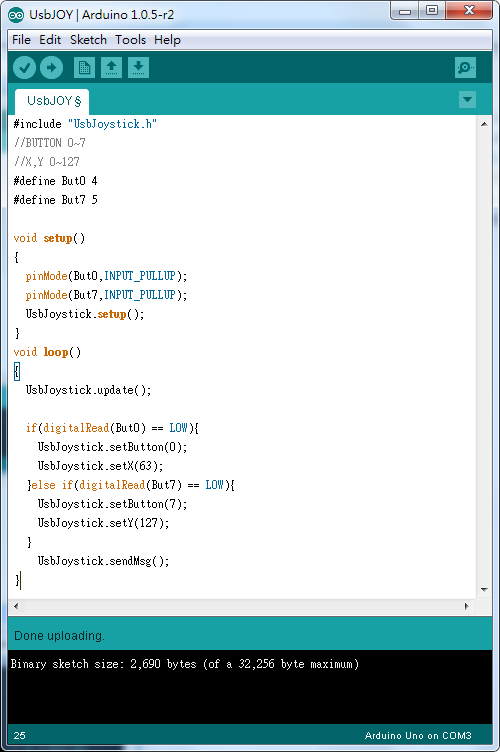

程式碼:https://www.dropbox.com/s/n0rgkb370wto2lv/UsbJOY.rar?dl=0
Hi, Sir ! your library is amazing ! amazing ! the best library on entire world ! 8 buttons ! fantastic ! congratulations ! you're a genius ! just one question: how the axis X and Y works ? because i'm trying to play a game, like a test , and the character go up even if i'm not press any button. How can I manage the axis ? i want to make a simple gamepad with up,. down, left , right and the 8 buttons. Can you help me, please ?
回覆刪除Thank you !
*Ps: Again, amazing library !
Greetings !
使用
刪除analogRead(PinX); analogRead(PinY);
去讀取數值並設置
UsbJoystick.setX(ValueX);UsbJoystick.setY(ValueY);
use
analogRead (PinX); analogRead (PinY);
To read and set values
UsbJoystick.setX (ValueX); UsbJoystick.setY (ValueY);
-----------------------------------------------------------
const int PinX = A0;
const int PinY = A1;
ValueX= analogRead(PinX);
ValueY= analogRead(PinY);
UsbJoystick.setX(ValueX >> 3); //X,Y 範圍 0~127
UsbJoystick.setY(ValueY >> 3);
//我沒測試過
//需要自己在修改
// I have not tested
// Need to modify them again
Sorry, Sir ! I'm late to thank you! I got it ! I used the map function! thank you for this magnificent work! thank you so much ! with a bluetooth module HC-06 and a android device, I created a simple application. With this application, you can simulate a Bluetooth gamepad, although there is no "multitouching".
刪除The application is made in the "App Inventor 2". Therefore, there is no way to enable multitouching. But it works! I do not know how to thank you. Also, you have that V-USB MIDI library. I'm trying to make a MIDI adapter for an old Yamaha keyboard. You are very talented ! Westerners need to learn from you.
You come to also modify the V-USB Keyboard and Mouse libraries? If yes, please, if you can make them available, I would greatly appreciate it. Their V-USB libraries are much more efficient and objective than those made in the Western Continent.
If you want the code that did and the application of "BTGamepad" based on your project, please just ask me when you want.
Thank you very much !
V-USB Keyboard and Mouse libraries can be found here
刪除http://coopermaa2nd.blogspot.tw/2011/10/v-usb-examples-for-arduino.html
http://coopermaa2nd.blogspot.com/2011/10/v-usb-for-arduino-usbkeyboard.html
:)